
Weather Station Sensors: What They Measure and How They Work
A practical guide to temperature, humidity, pressure, wind, rain, solar, UV, and lightning sensors—including what is measured, what is calculated, and what commonly goes wrong.
The sensor suite, decoded
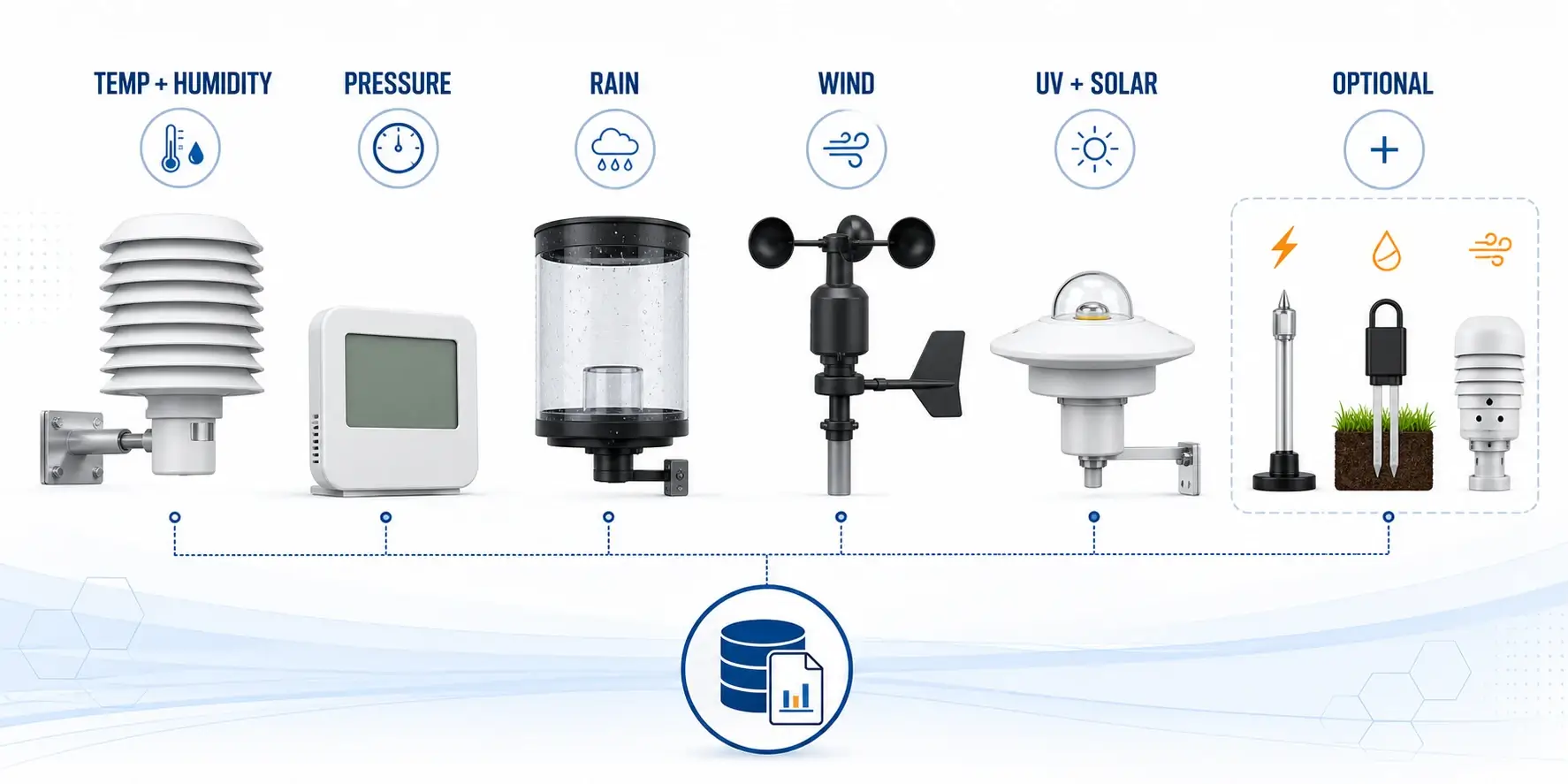
Temperature
A thermistor or similar electronic sensor changes with air temperature. A ventilated radiation shield limits false warming from sun and nearby surfaces.
Relative humidity
A humidity element responds to moisture in the air. Contamination, condensation, and age can cause drift.
Barometric pressure
A pressure sensor is normally housed in the console or indoor unit. Software may convert station pressure to sea-level pressure using elevation.
Wind speed
Cup, propeller, or ultrasonic anemometers sample air movement. Buildings and trees can distort the result long before the sensor itself fails.
Wind direction
A vane or ultrasonic array determines where the wind is coming from. The station must be aligned correctly to true or magnetic north as its manual specifies.
Precipitation
Tipping-bucket, weighing, haptic, or optical designs estimate liquid precipitation differently. Each design has distinct siting and maintenance needs.
Measured values vs. calculated values
| Reading | Is this directly measured? | What it depends on |
|---|---|---|
| Air temperature | Yes | Shielding, ventilation, height, nearby heat |
| Relative humidity | Yes | Sensor condition, exposure, condensation |
| Station pressure | Yes | Pressure sensor and calibration |
| Sea-level pressure | Usually calculated | Station pressure, elevation, algorithm |
| Dew point | Calculated | Temperature and relative humidity |
| Heat index | Calculated | Temperature and humidity within the formula’s applicable range |
| Wind chill | Calculated | Temperature and wind speed within the formula’s applicable range |
| Rainfall rate | Calculated from samples | Gauge design and sampling interval |
How common sensor designs work
Cup and vane wind sensors
Cups rotate with wind speed while a vane points into the wind. They are easy to understand but have moving parts that can wear, ice, or collect debris.
Ultrasonic wind sensors
They infer wind from changes in acoustic travel time and have no rotating cups. They still require clean exposure and can have model-specific behavior in rain, icing, or very light wind.
Tipping-bucket rain gauges
Water fills a small bucket that tips at a known volume. Leveling, splash, debris, insects, and intense rainfall can affect totals.
Haptic or optical rain detection
Some compact stations infer rain from impact or optical signals. They reduce moving parts but are not interchangeable with a carefully sited conventional gauge.
Solar and UV sensors
Solar-radiation sensors estimate incoming shortwave energy. UV sensors estimate ultraviolet exposure. Keep the sensing surface clean and level as directed.
Lightning sensors
Many consumer units detect radio-frequency signatures and estimate distance. Electrical noise can cause false detections, so placement and interpretation matter.
How a sensor reading becomes usable data
Update interval, radio range, missing-data handling, firmware, and gateway behavior are part of measurement quality. A good sensing element can still produce gaps or misleading derived values when its timestamp, units, elevation, calibration, or transmission path is wrong.
Placement matters more than the feature list
Temperature and humidity
Favor a representative, ventilated location away from direct radiation and artificial heat.
Wind
Seek open exposure above or well away from obstructions. A convenient roof edge often creates turbulent, unrepresentative flow.
Rain
Keep the gauge level and away from splash, overhangs, and wind-disturbing obstacles.
Combined “all-in-one” arrays force a siting compromise because wind, temperature, and rain do not share the same ideal exposure. See the all-in-one tradeoff guide and the installation guide before mounting.
What causes sensor error?
- Exposure error: roofs, walls, pavement, vents, sprinklers, trees, and turbulence.
- Installation error: an unlevel gauge, incorrect north alignment, wrong height, or loose mount.
- Maintenance error: debris, insects, corrosion, worn bearings, dirty optical surfaces, or weak batteries.
- Configuration error: wrong units, elevation, time zone, calibration offset, or rain-gauge factor.
- Sensor drift or failure: gradual bias, intermittent transmission, or implausible spikes.
Which sensors should you prioritize?
Start with the variables you will actually use and the exposure you can provide. Temperature, relative humidity, pressure, wind, and rainfall cover most household observation needs. UV, solar radiation, lightning, soil moisture, leaf wetness, particulate matter, and indoor carbon dioxide can be valuable, but only when the sensor is appropriate for the question and can be installed, maintained, and interpreted correctly.
Choose sound core measurements
Look for documented measurement ranges, update intervals, resolution, and stated accuracy. More decimal places do not prove better performance. Confirm that the rain collector can be leveled and cleaned and that wind components move freely or use a clearly documented nonmoving design.
Prefer flexibility when exposure matters
An integrated array is convenient, but separate or partly separable sensors allow wind, temperature, humidity, and rain to occupy more suitable locations. The all-in-one station guide explains when that flexibility is worth the added hardware.
Check replacement and data access
Before buying optional sensors, confirm console or gateway compatibility, channel limits, replacement availability, calibration options, battery requirements, and whether the data appears in exports or only inside an app. A sensor that cannot be serviced or accessed may add complexity without improving the record.
Care and validation
- Inspect the mount, shield, gauge opening, and moving parts.
- Compare temperature only under similar shade and ventilation conditions.
- Check rain totals with a properly placed manual gauge over several events.
- Verify wind direction after storms or maintenance.
- Record any offset and why it was applied, avoid “calibrating” away a siting problem.
Use the full weather-station maintenance checklist and accuracy guide for step-by-step checks.
Frequently asked questions
Which weather-station sensor is most likely to be wrong?
Exposure often creates larger errors than the electronics. Temperature near a hot wall, wind behind a roofline, and rain beneath a tree can all look like bad sensors.
Does a station measure dew point directly?
Most home stations calculate it from measured temperature and relative humidity.
Are ultrasonic sensors automatically more accurate?
The answer is no. They remove some moving-part issues, but accuracy still depends on design, conditions, siting, firmware, and maintenance.
Can one sensor location be ideal for every reading?
That rarely happens. Integrated stations prioritize convenience, separate sensors allow better exposure for each measurement.
Sources and further reading
These official and manufacturer references explain common weather sensors, measurement methods, and practical limitations.
WMO Guide to Instruments and Methods of Observation — International reference for meteorological instruments and observing practices.
NWS ASOS technical overview — Official overview of automated surface-observing sensors and measurements.
EPA Air Sensor Guidebook — Guidance on the capabilities and limits of consumer air sensors.
Tempest system FAQs — Manufacturer documentation for a modern integrated sensor system.