
Weather Station Rain Gauge Not Working? Diagnose It Step by Step
A zero or implausible rain total can begin at the display, the collector, the tipping mechanism, the sensor link, or the calibration setting. This sequence helps you identify the failed layer before replacing parts.
First confirm that you are viewing an accumulation field instead of rain rate after the shower has ended. If the station still shows zero, check local sensor reception, make the gauge safe to reach, clear the funnel and drain path, confirm it is level, and gently tip the mechanism by hand while watching the console. A registered tip points to a collection or siting problem, no registered tip points to a switch, cable, transmitter, pairing, or configuration problem.
Before touching the rain gauge
“Not working” describes several different symptoms. A console may show zero rain rate because rain has stopped, even while the daily or event total remains correct. An app may be stale while the console is recording tips normally. A clean collector may also miss water because the whole outdoor array has lost its radio link.
Switch between rain rate, event, hourly, daily, monthly, and total accumulation. Write down when each field resets. A rain-rate value normally falls to zero after no recent tips. That does not erase the accumulation.
If wind, outdoor temperature, humidity, UV, and rain all stopped at the same time, begin with sensor power or reception. If only rain is wrong, focus on the collector, tip mechanism, rain channel, and calibration.
Diagnose a rain gauge that reads zero
Use the least disruptive checks first. Record the current total and settings before a reset so you do not confuse lost history with a repaired sensor.
Verify that rain could enter the collector
Look for an overhang, tree canopy, roof edge, bird guard installed incorrectly, or a funnel still carrying a shipping insert. A nearby roof can block rain from one direction and splash extra water from another.
Clear the funnel and outlet
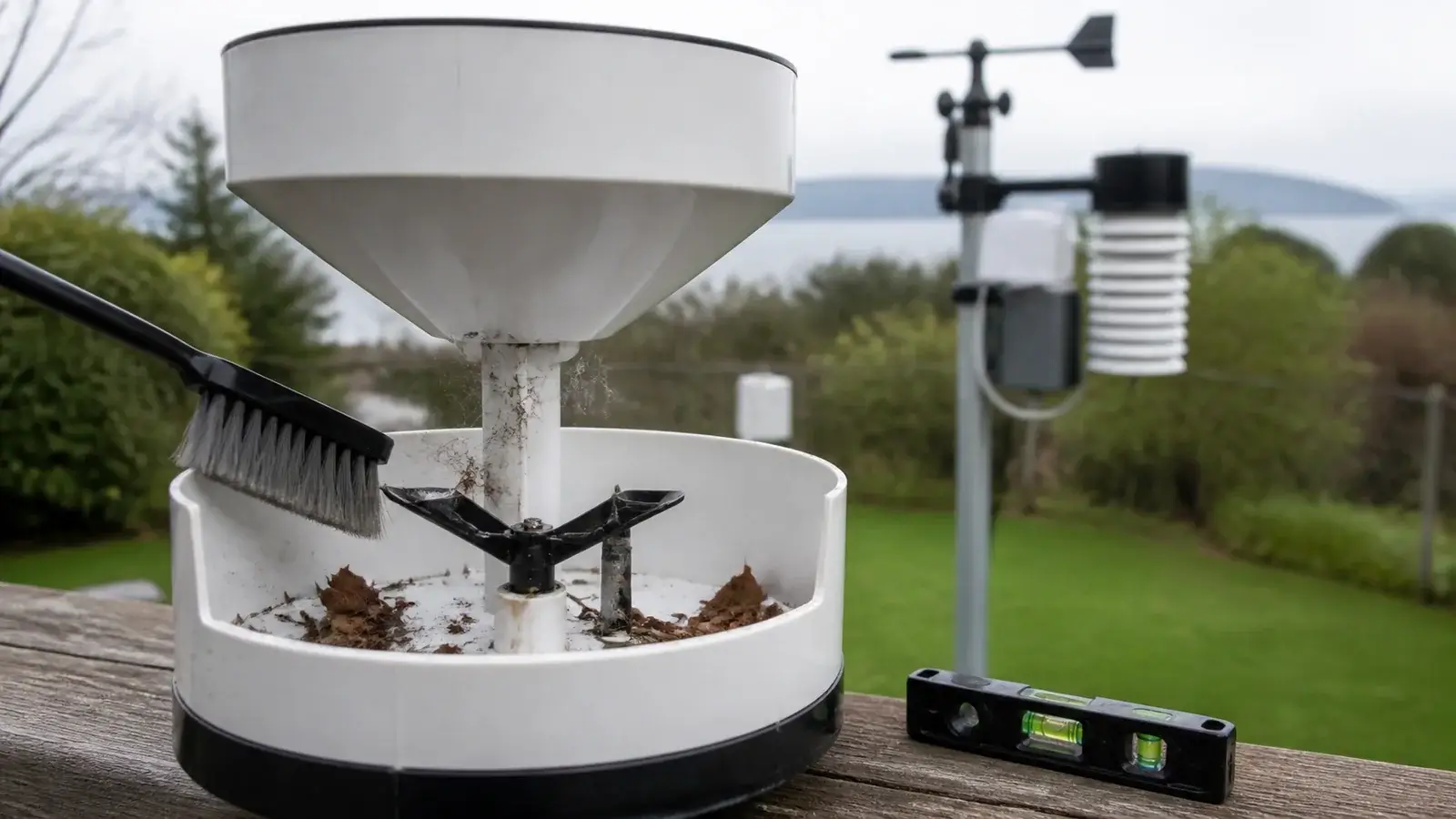
Remove leaves, pollen, seeds, insect nests, webs, and bird debris using the method in the manual. Confirm that water can pass through the screen and funnel instead of pooling or running down the outside.
Confirm the gauge is level and stable
A tipping mechanism depends on gravity. Recheck the built-in level or use a small bubble level on the specified reference surface. Tighten a loose mount and eliminate vibration without distorting the housing.
Inspect the tipping mechanism
With the collector open as the manual permits, make sure both cups or the tipping spoon can move freely. Remove debris with a soft brush or damp cloth. Do not bend the stop screws or change calibration hardware casually.
Perform a gentle manual-tip check
Watch the console or local app while slowly moving the bucket through one or more full tips. Allow for the product’s normal reporting delay. A registered increment proves more of the electrical path than pouring water into the funnel does.
Follow the model-specific signal test
If manual tips do not register, check the rain cable where one exists, transmitter battery condition, sensor search or pairing status, channel assignment, and current manual. Avoid applying another brand’s reset order to your station.
What the symptom usually points to
| What you see | Most useful next check | Do not assume |
|---|---|---|
| Rain rate is zero after rain | Open the daily or event accumulation and check its reset rule. | The gauge failed, rate is a recent intensity, not a permanent total. |
| All outdoor values are missing | Check outdoor power, transmitter activity, pairing, range, and console reception. | The rain mechanism alone is responsible. |
| Manual tips register, natural rain does not | Inspect the funnel, screen, water path, level, siting, and possible shipping restraint. | The reed switch or radio link is bad. |
| Manual tips never register | Check cable/connectors if present, transmitter path, sensor assignment, and manufacturer diagnostics. | Calibration will repair a missing pulse. |
| Total is consistently low | Check level, wind exposure, splash loss, partial blockage, and test method before applying an offset. | A nearby gauge experienced the same rainfall. |
| Total jumps on a dry day | Look for vibration, maintenance movement, delayed water, unstable mounting, or a false electronic pulse. | The station detected real rain. |
Test with water without creating a bad calibration
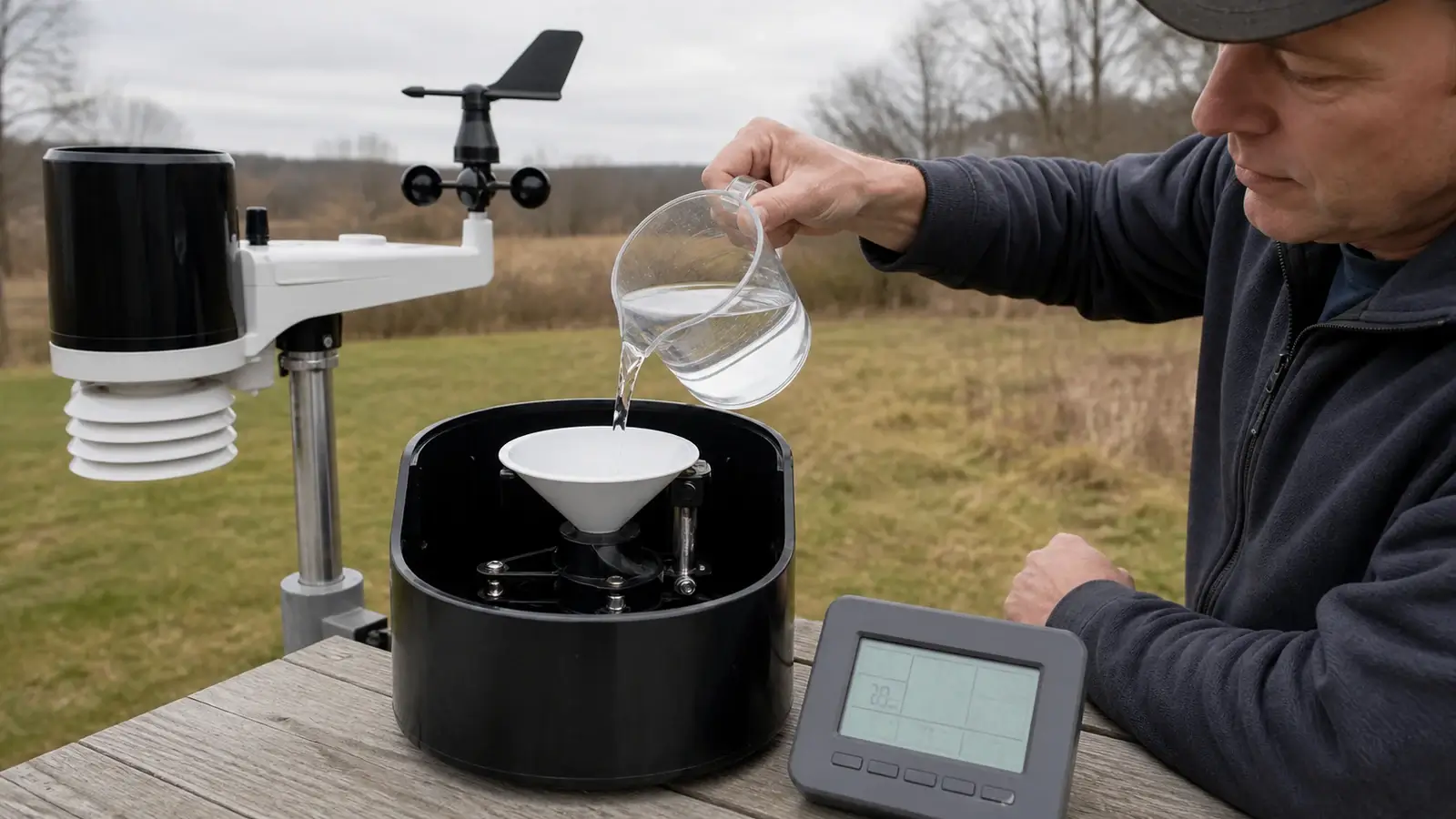
A fast pour is useful only as a functional check. Pouring a cup through the funnel proves that water can create tips, but it does not reproduce a measured rainfall depth. For a quantitative test, use the exact volume and delivery rate in the manufacturer procedure. The volume depends on collector area and the amount represented by each tip.
Deliver test water slowly enough that the mechanism completes each movement. Very rapid flow can pass through while a bucket is moving and make a healthy tipping gauge read low. Count the expected tips or compare the final accumulation specified by the procedure. Repeat the test rather than changing an offset after one run.
Clean, calibrate, repair, or replace?
Choose this when manual tips register and the fault is visible debris, drainage, movement, or tilt. Recheck the next natural event and document what changed.
Consider a manufacturer-supported adjustment only after the gauge works mechanically and shows a repeatable bias under a controlled test. Record the old value and never use calibration to hide poor exposure.
A cable, plug, reed switch, transmitter, or pairing fault is more likely when the mechanism moves but no tips register. Use model-specific parts and support instructions.
Some stations accept a rain sensor or replacement array, others bind the gauge to an integrated suite. Verify exact compatibility, radio region, console support, and calibration steps before ordering.
After any repair, note the date, old and new settings, manual-tip result, and the first comparison event. That maintenance record makes the next unusual total much easier to diagnose.
Frequently asked questions
Why does my weather station show 0.00 rain while it is raining?
Check whether other outdoor data are current, whether you are viewing rain rate or an accumulation, and whether the collector has produced enough water for its first tip. Then inspect the funnel, level, and tipping mechanism safely.
Can spiders or leaves stop a weather station rain gauge?
The answer is yes. Webs, insects, pollen, seeds, leaves, and bird debris can block the funnel or restrict the tipping mechanism. Use the cleaning method in the current manual and avoid oils or chemicals that can hold dirt.
Should I pour water into the rain gauge to test it?
A slow pour can confirm basic operation, but an accuracy test requires the manufacturer’s specified volume and delivery rate. A fast pour can make a working tipping bucket undercount.
Why did my rain total reset to zero?
Daily, event, weekly, monthly, yearly, and lifetime fields use different reset rules. Confirm the selected field, station clock, time zone, reset hour, and whether a console reset cleared stored totals.
Sources and further reading
These primary and manufacturer references support the definitions, diagnostic steps, and limitations in this guide.
Cornell NEWA Weather Station Maintenance Guide — routine inspection and sensor maintenance
Ambient Weather: rain not updating or returning to zero — manufacturer example of field selection, cleaning, manual-tip testing, and fault isolation
Davis Instruments Vantage Vue maintenance guidance — collector and tipping-spoon cleaning guidance
Weather Underground Personal Weather Station Installation Guide — consumer-station siting and exposure examples
Model controls and reset sequences vary. Use the current manual for your exact console, sensor, hardware revision, and radio region before changing calibration, power, pairing, or network settings.