
What Do Weather Station Forecast Icons and Pressure Arrows Mean?
Read the forecast, pressure and wind fields correctly, then check an unexpected symbol without resetting the station unnecessarily.
A rain cloud on your console can appear while the sun is shining. The small arrow beside it may describe pressure, while another arrow elsewhere on the screen describes wind. Reading the right field is the first step toward understanding either one.
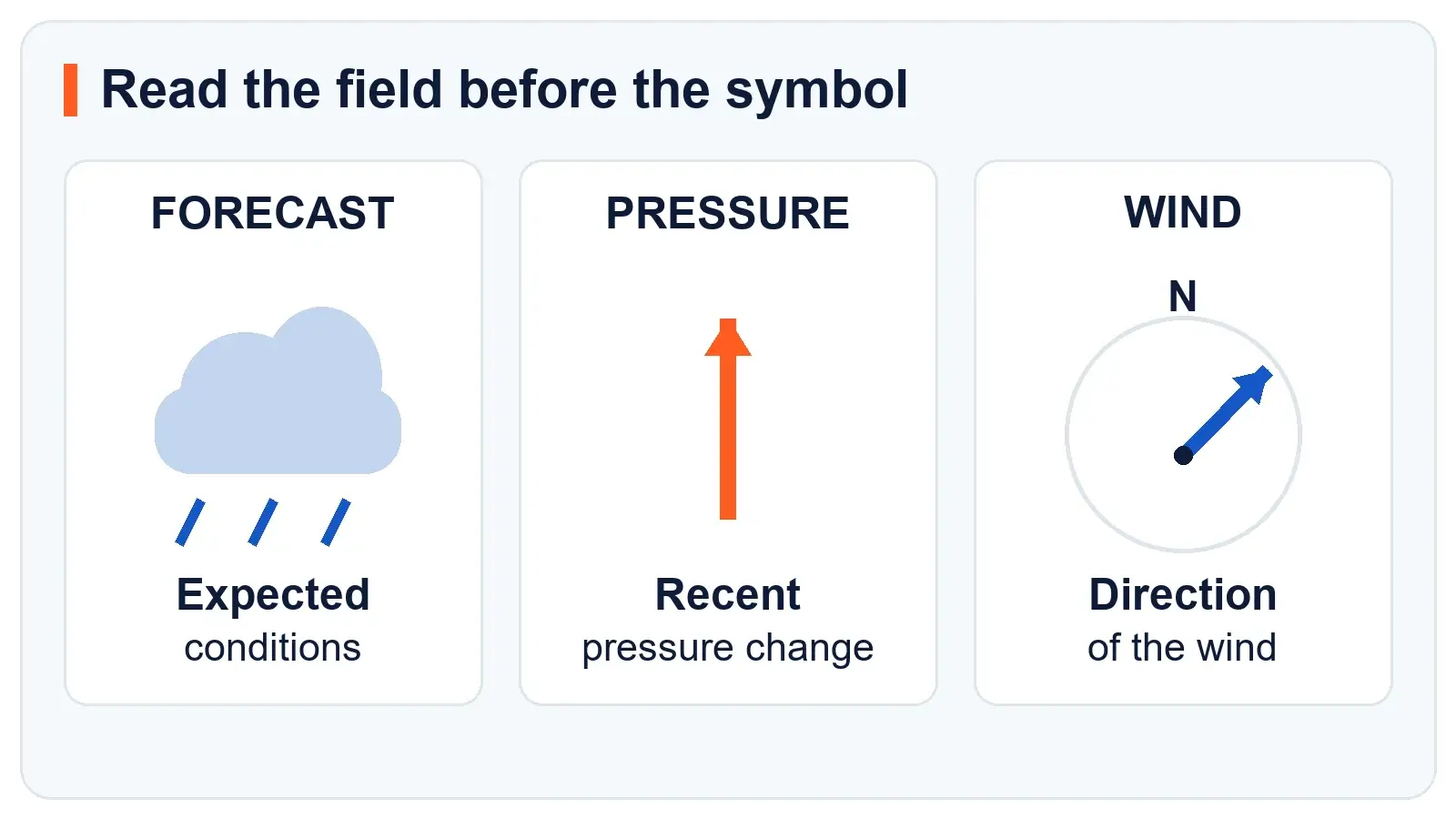
A weather station's forecast icon usually describes expected conditions for a future period. A pressure arrow describes whether barometric pressure has been rising, falling, or staying within the station's steady range. Check the field label and the manual before assigning a meaning to an unfamiliar symbol.
First identify the field
Start with the words around the symbol. “Forecast” or “Future Forecast” points to a prediction. “Pressure,” “BARO,” “REL,” or “ABS” points to the barometer. “Wind,” a compass rose, or a direction such as NNW points to wind. A battery outline or antenna icon describes the equipment.
Make that distinction before comparing the display with the sky. A forecast can be wrong even when the sensors are working. A disconnected sensor can also leave an old reading on screen. Those are different problems with different checks.
| Symbol or field | What to read it as | What to check next |
|---|---|---|
| Sun, cloud or rain in a forecast panel | An expected weather category | The forecast period and source |
| Arrow beside pressure | A recent pressure tendency | The model's trend window and threshold |
| Arrow in a wind panel | A wind direction indicator | The compass legend and averaging period |
| Arrow beside temperature or humidity | A trend for that measurement | The adjacent field label |
| Battery, antenna or Wi-Fi symbol | A power or connection status | The equipment legend and last update |
| Snowflake, moon or lightning bolt | A model-specific symbol | Its exact location and manual definition |
One brand can use several icon sets. AcuRite's icon directory groups forecast artwork by model number and distinguishes different forecasting methods. A visually similar symbol on a different console is not enough to establish the same meaning.
What the pressure arrows mean
For the pressure-tendency indicators described by La Crosse Technology, an upward arrow indicates rising pressure, a downward arrow indicates falling pressure, and a right-pointing arrow indicates steady pressure.
Treat those as descriptions of the pressure history. Rising pressure can support an improving-weather tendency. Falling pressure can support an unsettled-weather tendency. Neither arrow promises a particular outcome at your house.
A steady arrow does not mean the atmosphere has stopped changing. It means the change did not cross that model's threshold during its defined window. Do not borrow a threshold from another manufacturer's manual, or assume every console uses the three-hour tendency familiar from meteorological station plots.
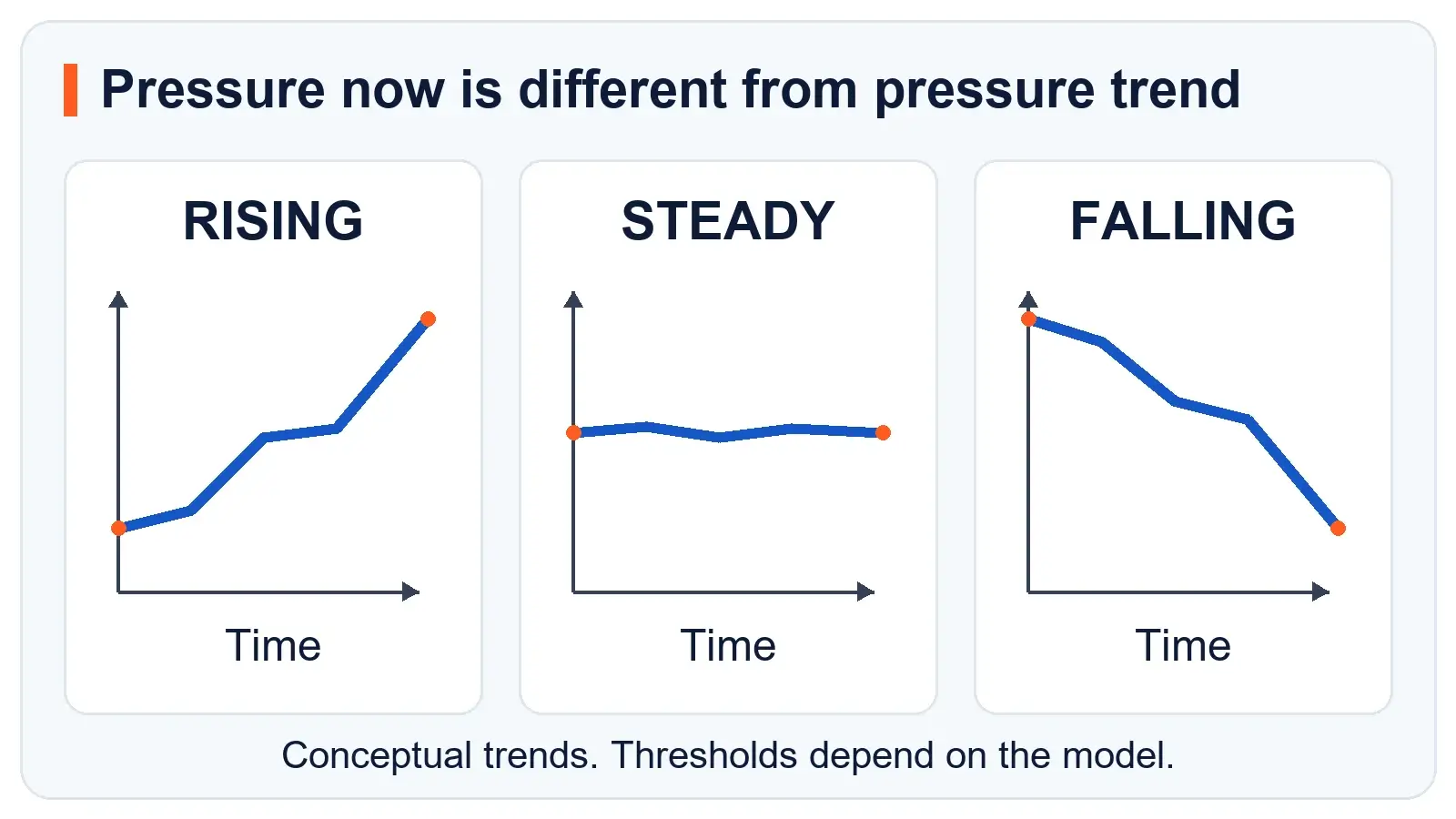
The number and the arrow answer different questions. The number reports pressure now. The arrow summarizes its recent movement. A relatively high reading can be falling, and a relatively low reading can be rising.
If the number seems far from a nearby report, check whether both are the same kind of pressure before adjusting anything. Our station pressure and sea-level pressure guide explains why an unadjusted reading at elevation can normally be much lower than a weather app's sea-level value.
Why a rain icon can appear in sunshine
A future forecast should be judged against its intended period. AcuRite describes its common Future Forecast as a prediction for the next 12 to 24 hours. That does not mean every AcuRite display, every connected forecast or every other brand uses that interval.
For example, suppose a console shows rain at breakfast while the yard is dry. First check the legend and lead time. If the icon concerns later conditions, the current sunshine is not evidence of a failed rain gauge. Find the station's measured rainfall field separately.
The reverse can happen too. Rain outside does not require an immediate change to a broad pressure-based forecast icon. A short local shower and a regional pressure trend describe different aspects of the weather.
A single icon also omits details that matter when planning a day: when rain might begin, where it is likely, how much could fall and how uncertain the prediction is. Use a location-specific forecast when those details affect the decision.
A flashing storm icon is not a measured lightning strike
Ambient Weather's Osprey-series flashing-icon explanation ties the flashing forecast symbol to a rapid pressure drop. It describes a pressure-based storm prediction, not a lightning observation.
That distinction also matters on a screen with an optional lightning detector. A detector's strike count, last-strike time or distance field is a separate feature. Do not assume a lightning-shaped picture proves that a detector is installed or that a strike was measured.
The WS-4000 manual illustrates the problem clearly. Its home-screen legend separates the forecast icon, pressure-change arrow, wind-direction arrows and lightning-detector data. It also describes a lightning-shaped advisory associated with high dew point. Identify the field before interpreting the shape.
For hazardous-weather decisions, check your National Weather Service forecast and warnings or your country's official weather service. A consumer forecast symbol is not an official warning, and the absence of a storm icon is not an all-clear.
Local console and app forecasts can disagree
A pressure-based console forecast and an internet forecast need not use the same information. The first interprets local observations using the station's own method. The second can come from a provider serving a selected location and forecast period.
My AcuRite's forecast help provides a concrete example: its online forecast is based on the address or ZIP code associated with the connection device. That forecast is distinct from the local measurements shown on the dashboard.
Check the label, valid time and configured location on each screen. A disagreement between a console and app does not by itself show that the outdoor sensor is inaccurate. It may simply compare two forecast products.
Check an unexpected icon in this order
- Match the exact console model. Find its icon legend, including any separate meanings for the forecast panel, measurement fields and status area. Save the relevant manual page for future checks.
- Identify the forecast source and time period. Determine whether the symbol is locally calculated or downloaded. Compare forecasts for the same place and valid time.
- Look for a learning or startup state. Give the station the period specified in its instructions. Avoid repeated resets merely to make the picture agree with today's sky.
- Inspect the underlying observations. Check whether the pressure history is updating and whether sensor readings are fresh. Diagnose missing data separately from a disappointing forecast.
- Verify applicable settings. Check time, location, units and any elevation or relative-pressure settings required by the model. Record existing settings before changing them.
- Compare several forecast periods. Keep a short log of the icon, its intended time and the later conditions. A repeated pattern is more useful for troubleshooting than a single mismatch.
For supported AcuRite self-calibrating forecasters, the Learning Mode explanation says the visible learning icon disappears after 14 days, while the underlying algorithm continues for about 33 days. This is a model-specific example, not a waiting period for all weather stations.
If the pressure values themselves need attention, follow our barometric-pressure calibration guide. Changing calibration simply to force a preferred forecast picture can replace an understandable limitation with a measurement problem.
Common questions
Does an upward arrow mean the wind is blowing north?
An upward arrow in the pressure field means rising pressure on consoles using that convention. A wind arrow belongs to a different field and must be read with its compass legend. Its position on the screen matters more than its shape.
Why is there a sun symbol at night?
Check whether the icon represents a general fair-weather category or a time-specific forecast. Also check whether a nearby moon graphic is a moon-phase display. The manual will show whether the model changes its forecast artwork between day and night.
Does a snowflake mean snow is falling?
A snowflake may identify a forecast category or a temperature-related alert, depending on the console. Check the legend and field label. It does not establish measured snowfall depth or guarantee icy surfaces.
Should I reset the station when the icon looks wrong?
Begin with the source, forecast period, learning state and underlying readings. Follow the model's reset procedure only when the manufacturer recommends it for the diagnosed problem. Preserve settings and history where possible.
Sources and further reading
Manufacturer icon legends, manuals, and support guidance were checked on October 23, 2026. Use the exact console model to interpret a symbol. The diagrams explain field types and trends without setting universal thresholds.
- AcuRite icon definitions and model directory identifies forecast symbols and the applicable forecast periods.
- La Crosse pressure-tendency arrow explanation describes rising, falling, and steady indicators.
- Ambient Weather flashing forecast icon guidance and the WS-4000 manual distinguish forecast, pressure, wind, and lightning-related fields.
- AcuRite Learning Mode and My AcuRite forecast help explain startup learning and the connected forecast source.
- National Weather Service forecasts and warnings provide the official information to use for hazardous-weather decisions.