
Does a Home Weather Station Need Wi-Fi? What Works Offline
A home weather station with a compatible indoor console can show your backyard’s temperature, wind and rain without an internet connection. The important buying question is which features remain available locally, and which depend on an app, an account or an online service.
Many home weather stations do not need Wi-Fi for local measurements and a compatible indoor display. Remote phone viewing and online uploads need a working internet connection at the station. Wi-Fi is one way to provide that connection, but some systems support Ethernet or cellular equipment instead. Check the exact console or hub included in the package, because a screen, local recording and cloud access are separate capabilities.
Start with how you will use your station
- You mainly check a kitchen or desk display. Look for a station that receives and displays its own sensor readings locally. A Wi-Fi-capable console can still be useful even if you never connect it to the internet.
- You want to check your home while away. Choose a supported online connection and remote-viewing service. Your phone having mobile service does not give the station at home an internet connection.
- You want a continuous weather record. Check local storage and what happens to missed online observations. A console showing live temperature is not proof that it saves a downloadable history.
These choices help narrow our recommended home weather stations without paying for connected features you will not use or overlooking a feature you need.
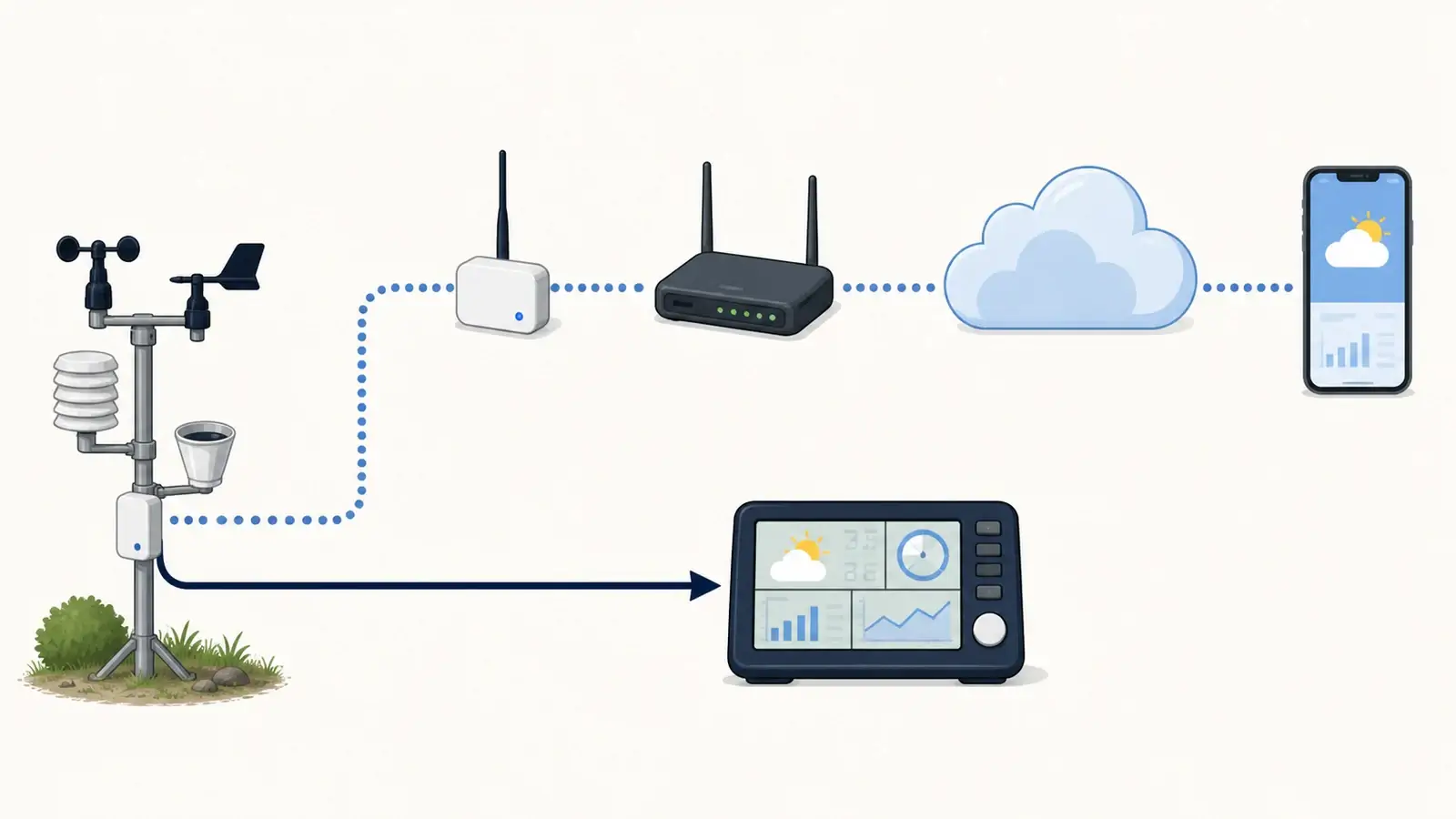
Wireless sensors, Wi-Fi and internet are different connections
In many home systems, the outdoor sensor array sends observations to the indoor console or hub over its own radio link. The receiver can then use Wi-Fi to reach your router. The router connects to the internet, where the manufacturer’s service provides online dashboards and sharing.
That distinction explains two common situations: a console can keep updating while the internet is down, and your home Wi-Fi can work while your internet provider is offline. It also means the outdoor array’s transmission range is not the same as your router’s Wi-Fi coverage.
Place the connected console or hub where it can communicate with both the sensors and the router. Moving a router closer to the outdoor array will not fix every sensor reception problem. If the console itself is missing outdoor readings, start with our sensor-to-console reception guide.
Some receivers offer another network connection. For example, the Ecowitt GW3000 documentation describes both Wi-Fi and Ethernet. A wired connection still needs a working internet service for cloud uploads, and the gateway needs compatible sensors to form a weather station.
Can continue without internet when supported and powered.
Provides fresh remote readings and uploads while the full path works.
What keeps working during an outage?
The table assumes your sensors and receiver are already set up, paired, powered and within radio range unless the row says otherwise. Features vary by model.
| What is unavailable? | What can continue? | What you may lose |
|---|---|---|
| Internet service, with the home network still running | Local console readings, supported local recording, and local network access where the model provides it | Fresh remote readings, cloud notifications, live uploads and newly downloaded forecast information |
| Router or the receiver’s Wi-Fi connection | Sensor-to-console readings and supported storage inside the receiver | Network-based viewing and uploads through that connection. Local Bluetooth access is a separate, model-dependent exception |
| Console or hub power | An independently powered outdoor sensor may keep measuring | Reception, display and logging at the unpowered receiver. Sensor buffering is model dependent |
| Outdoor sensor power or its radio connection | Indoor measurements and previously saved information may remain available | Fresh readings from the affected outdoor sensor, even if the console still shows older values |
Check the timestamp, not just the screen. An app or display may retain an old reading after a connection fails. A familiar-looking temperature does not establish that observations are still arriving.
A backup battery in the outdoor sensor does not power the indoor console, hub, router or modem. If outage operation matters, check each device’s power needs and what its backup mode actually supports. Some consoles reduce functions on batteries. A battery backup for your equipment also cannot restore an outage at the internet provider.
Familiar stations show why the exact model matters
These examples illustrate different ownership choices. They are not interchangeable promises for every station from the same brand.
Ambient Weather WS-2902D: check which sensors you can see locally
The WS-2902D console receives the outdoor array over a separate radio link and uses Wi-Fi for online reporting. Its normal weather display does not depend on the same connection as its uploads. However, Ambient says certain optional sensors, including WH31E temperature/humidity sensors and PM25 air-quality sensors, pass their readings through to Ambient Weather Network rather than displaying on this console.
If an extra room or air-quality reading is the reason you are buying, check where you will actually see it. Read our WS-2902 review and Ambient’s exact WS-2902D console description. Earlier console revisions use different network-setup methods.
Ambient Weather WS-2000: a console with local history
The WS-2000 offers a local display, archive memory and export to an optional memory card. That makes it a more relevant example when you want to review readings at home as well as upload them. Its local archive and its online account are separate records. The manual specifies that recording channel 1–8 add-on sensor data requires leaving the memory card inserted.
Our WS-2000 review explains the display and expansion tradeoffs. The WS-2000 manual documents archive mode, card export and the console’s power requirements. Do not assume that exporting a file also fills every gap in an online service.
Tempest: app-centered, with temporary-outage protection
Tempest uses an indoor Hub and an app-centered viewing system. WeatherFlow says a powered Hub can retain about a week of data from one Tempest during an internet outage and publish it when the connection returns. Nearby Bluetooth access is limited, and the manufacturer does not recommend permanent operation without Wi-Fi. Initial Hub setup requires its mobile app.
That is useful outage resilience, but it is a different experience from glancing at a dedicated console. Read our Tempest review and the manufacturer’s outage and setup FAQs before choosing it for a home without internet.
Saving readings is not the same as uploading them later
Ask three separate questions before buying:
- Can I see new readings without internet?
- Can the system save those readings locally, and for how long?
- Will it automatically send the missing history to the particular online service I use?
A station may satisfy the first two without satisfying the third. Ecowitt, for example, documents offline memory-card recording for its GW3000 and WS6210 gateways, but says those offline records are not automatically uploaded to Ecowitt Cloud after reconnection. Its offline-storage guidance distinguishes saved files from the online record.
The destination matters too. A manufacturer’s recovery feature is not automatically a promise that Weather Underground or another service will receive the same missing observations. If current console readings look normal but your online station is stale, use our Weather Underground upload troubleshooting guide.
What to check before buying for your home
Confirm the included receiver. A sensor array, a console bundle and a displayless hub package can have different viewing and storage capabilities. Look at the exact package contents, not just the outdoor sensor name.
Separate setup from everyday use. Check whether initial pairing or configuration requires a compatible phone, an account or internet access. A system that continues through a temporary outage is not necessarily suitable for first-time setup at a disconnected cabin.
Check your router against the model’s requirements. The WS-2000 and Tempest documentation specifies 2.4 GHz Wi-Fi. A dual-band router can provide that band, but the station must also support the network’s security and setup method. Do not assume that a Wi-Fi label guarantees compatibility with every guest, hotel or mesh-network configuration.
Decide where history must live. If you want to keep a rainfall record even when the internet fails, verify the recording interval, storage capacity, supported measurements, export method and power requirements. Check subscription terms for the particular online history or alert feature you want.
Plan remote access at the station location. A no-internet cabin can support a local display. Checking it from your other home requires a compatible connection at the cabin too. Confirm any cellular or hotspot arrangement with the station maker before purchasing additional equipment.
Connectivity will not correct a blocked rain gauge or poor wind-sensor placement. Start with the measurements and siting your property can support, then compare display, storage and online features.
A simple offline check for an existing station
Choose a convenient time when nobody needs the connection. Keep the sensors and receiver powered, and briefly disconnect only the router’s internet/WAN connection if you can do so safely without disturbing other equipment. Leave the local network running and do not factory-reset the station.
Watch for fresh readings or an updating reception indicator on the local display. Check any local history feature you intend to use, then restore the connection and inspect both current online readings and the outage period. This tests loss of internet service, not a power failure. Compare the result with your model’s manual before relying on it during a longer outage.
Frequently asked questions
Can I use a home weather station without a smartphone?
A suitable console-based station can provide everyday readings without a phone. Verify its initial setup method too. An app-centered model may require a supported phone for setup even when another device can display its online dashboard later.
Does the outdoor sensor connect directly to my Wi-Fi?
In many home-station systems, it uses a separate radio link to a compatible console or hub. The receiver handles the network connection. Check your exact model rather than treating “wireless” as proof of direct Wi-Fi operation.
Does Wi-Fi make a weather station more accurate?
Wi-Fi itself does not improve the sensor or its exposure. Connectivity can provide access to processing, updates or online products that vary by system, but it cannot compensate for every siting or maintenance problem.
Can a station work without Wi-Fi but still upload online?
Yes, if its receiver supports another internet path, such as Ethernet or compatible cellular equipment. Those options must be supported by the particular system. A phone’s mobile connection alone does not connect a station left at home.
Sources and further reading
Ambient WS-2902D console documentation — Local radio, network setup and optional-sensor display limits.
Ambient WS-2000 manual, version 2.20 — Local history, card recording/export, power and network requirements.
Tempest System FAQs — Setup, temporary outages, buffering and nearby viewing.
Ecowitt GW3000 documentation — Wi-Fi, Ethernet and local-access capabilities.
Ecowitt offline-storage guidance — Local files versus automatic Ecowitt Cloud recovery.